Spot
EC2 instances can be launched as on-demand or spot.
On-demand instances
By default, Sprinters launches your runners as on-demand instances. They are about 3-4x cheaper than GitHub-hosted runners without any restrictions.
You can optionally make this default explicit, by specifying spot=false in the the runs-on: label:
runs-on: sprinters:aws:ubuntu-latest:spot=false
Spot instances
You can however save even more by switching to spot instances. They are are between 55% and 90% cheaper than on-demand instances.
There is only one catch: AWS can interrupt them at any time with 2 minutes notice.
You can configure a job to use spot instances by setting spot=true:
runs-on: sprinters:aws:ubuntu-latest:spot=true
Prerequisite
In order to use spot instances, your AWS account must have the AWSServiceRoleForEC2Spot IAM service-linked role.
If you have previously launched a spot instance using the AWS Console, this role will have automatically been created for you.
If not, you can easily create it manually using the AWS CLI or the IAM console .
Designing for interruptions
Jobs should only be run on spot instances if it is acceptable for them to fail due to instance interruption.
This can be accomplished, while still maintaining most of the savings, by splitting jobs into interruptible parts on spot instances and non-interruptible parts on on-demand instances.
You could, for example, run compile and test tasks on spot instances and deploy the application using on-demand instances.
Auto-selection
AWS sometimes doesn’t have enough capacity available and will refuse to launch your instances as spot. To avoid having your jobs fail because of this, Sprinters has a handy fallback mechanism, where it will first try to launch your job using a spot instance. If this doesn’t succeed, it will immediately retry using an on-demand instance.
All you need to do to activate this, is set spot=auto:
runs-on: sprinters:aws:ubuntu-latest:spot=auto
Automatic rerun
When an instance is launched as spot, AWS will occasionally terminate it to reclaim capacity for on-demand ones. This will cause your job to fail. To avoid having to manually restart it and hope it will run to completion the next time, Sprinters offers a convenient possibility to automatically rerun it as on-demand after this occurs.
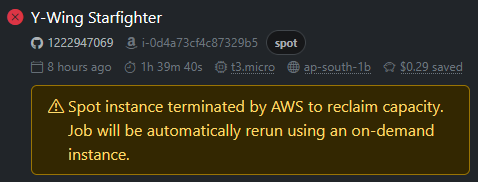
To enable this, simply set spot=rerun:
runs-on: sprinters:aws:ubuntu-latest:spot=rerun
This is effectively the same functionality as spot=auto, but with automatic reruns.