Temp Storage
Every Sprinters-powered runner comes with temp storage. The size and type depends on the instance’s storage:
| Instance Storage | Temp Storage | Size | Available Alternatives |
|---|---|---|---|
| EBS-only | EBS gp3 volume |
10 GiB |
zram |
| Ephemeral NVMe | First ephemeral NVMe volume |
Depends on instance type | zram, gp3 |
Storage Type
Sprinters offers 3 types of temp storage: gp3 (EBS), ephemeral (local NVMe) and zram (zstd-compressed RAM disk).
| Type | Description | Performance | Max Size | EBS Costs |
|---|---|---|---|---|
gp3 |
EBS volume | + | 64 TiB | Standard EBS fees |
ephemeral |
Internal NVMe storage | ++ | Depends on instance type | None |
zram |
RAM disk (compressed) | +++ | Up to 3x RAM | None |
gp3
gp3 volumes are compatible with all instance types, offer the largest sizes and have tunable performance.
Size
You can adjust the size of your gp3 volume by specifying the desired number of GiB (from 1 to 65536) in your job’s runs-on label.
For example, a 64 GiB volume can be requested like this:
runs-on: sprinters:aws:ubuntu-latest:temp=gp3/64
Cost Optimization
EBS charges are based on the allocated size and provisioned performance. To help you right-size, Sprinters logs your actual temp disk utilization at the end of every job:
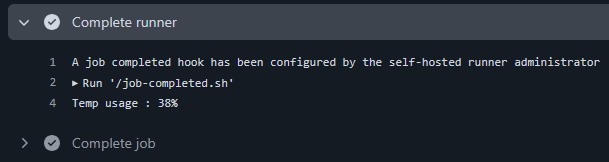
If your utilization is low, you can safely reduce the size in your label to save on costs.
Performance Tuning
You can fine-tune your gp3 performance and costs by specifying IOPS (between 3000 and 16000) and throughput (between 125 and 1000 MiB/s).
For example, a gp3 volume of 100 GiB with 4000 IOPS and 750 MiB/s throughput can be specified as follows:
runs-on: sprinters:aws:ubuntu-latest:temp=gp3/100/4000/750
Calculating the maximum supported IOPS and throughput is a little cumbersome as those limits depend on the volume size (for IOPS) and IOPS (for throughput).
To simplify this you can also use max to instruct Sprinters to automatically calculate those for you:
runs-on: sprinters:aws:ubuntu-latest:temp=gp3/100/max/max
ephemeral
Instances with ephemeral NVMe storage by default use their first local disk for high-performance, high-capacity temp space with zero EBS costs.
You can optionally specify this explicitly as follows:
runs-on: sprinters:aws:ubuntu-latest:c6id.8xlarge:temp=ephemeral
zram
zram is a zstd-compressed RAM disk. It offers several million IOPS and eliminates all EBS costs.
As it is a RAM disk, all data you write to it uses some memory (albeit with an average 2x or 3x compression ratio). This is a really solid choice for jobs on machines with sufficient memory requiring maximum performance.
To use a zram disk capable of storing up to 16 GiB of uncompressed data (actual ram usage with both 2x or 3x less), specify it in the label like this:
runs-on: sprinters:aws:ubuntu-latest:temp=zram/16